
SkyArts Editor4.5.2 - Google Play
You'll be able to see results in few seconds.
Publisher Description
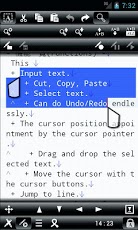
This application is a multi-function text editor for Android.
In addition to regular text input editing, Undo / Redo can endlessly, a shortcut key operation, and automation of key macro editing, call the various functions through gestures, advanced text editing is available.
This application can use the following functions.
* The editing of the text file.
+ Undo / Redo infinite.
+ The cursor position appointment by the cursor pointer.
+ Search, replace.
+ Operation by the shortcut key.
+ Select text is easily possible a "Select-mode".
+ Line number, charactor position indication.
+ Character code automatic distinction.
+ Convert line break character.
+ Editing by key macro.
+ Insert date / time.
+ Converted to uppercase / lowercase.
+ Conversion to full width/ half width chars.
+ Insert registered text.
* Settings
+ Detailed color appointment. (Text, Background, Cursor, Cursor line background, Selected text, Line break, Tab char, Full size space)
+ A font change
+ Text size
+ Brightness
+ Tab indent
+ Indication / non-indication change of the tool bar and status bar
+ An indication point change of the tool bar. (Upper or Bottom)
+ The key of shortcut key
+ Insert text
+ Gestures
* Loading and saving files
+ Character code read by automatic detection
+ Determining line break char
+ Read by the specified character code
+ Reading file specification
+ Reading from a bookmark
+ Reading history (used to record the last character code to open the file in question)
+ Character code stored in the specified line break char.
+ Save As
* The management capability of the file and the folder
+ The editing of the file and the folder. (Copy, Move, Rename, Delete etc.)
+ Sort out items. (name order, last update order, size order)
+ The email attachment of the file.
* Shortcut function
+ Create the shortcut of the file to a home screen.
+ Start direct from the shortcut of the file of the home screen.
+ Create the shortcut of the folder to a home screen.
+ It is started a direct folder by the shortcut of the folder of the home screen.
+ It is called by outside application and opens up a text file.
+ Open up the attached file of the email.
+ etc.
* Backup function (When application was terminated by the OS's, store backup)
* Robust function (When an internal error occurred, store a file like a backup function)
Attention:
+ The handling of function number of times to Undo/Redo depends on the quantity of storage memory.
+ When unexpected, sometimes may not completely handle the backup function and the robust function. However, security will increase because there are these functions!
== More infomation ==
http://skyarts.com/products/android/skyartseditor/
== Made in Japan ==
High quality made in Japan!
== Description of permission settings ==
Since this application has many features that has the following permissions set.
In order to do so can never be illegal, please be assured.
+ Read and write SD card (required to view the contents of the SD card)
+ Allow shortcut (you need to create a shortcut on the home screen).
+ Allow license verification
About SkyArts Editor
The company that develops SkyArts Editor is SkyArts.com. The latest version released by its developer is 4.5.2.
To install SkyArts Editor on your Android device, just click the green Continue To App button above to start the installation process. The app is listed on our website since 2013-07-13 and was downloaded 0 times. We have already checked if the download link is safe, however for your own protection we recommend that you scan the downloaded app with your antivirus. Your antivirus may detect the SkyArts Editor as malware as malware if the download link to com.skyarts.android.skyartseditor is broken.
How to install SkyArts Editor on your Android device:
- Click on the Continue To App button on our website. This will redirect you to Google Play.
- Once the SkyArts Editor is shown in the Google Play listing of your Android device, you can start its download and installation. Tap on the Install button located below the search bar and to the right of the app icon.
- A pop-up window with the permissions required by SkyArts Editor will be shown. Click on Accept to continue the process.
- SkyArts Editor will be downloaded onto your device, displaying a progress. Once the download completes, the installation will start and you'll get a notification after the installation is finished.
Program Details
System requirements
Download information
Pricing
Version History
version 4.5.2
posted on 2013-07-13
Added a theme setting for Android 4.x.,Fixed the problem that appears when you cancel the file read.,Fixed the internal processing.
version 4.5.2
posted on 2012-12-20
Several fixes and updates
Disclaimer
Official Google Play Link
We do not host SkyArts Editor on our servers. We did not scan it for viruses, adware, spyware or other type of malware. This app is hosted by Google and passed their terms and conditions to be listed there. We recommend caution when installing it.
The Google Play link for SkyArts Editor is provided to you by apps112.com without any warranties, representations or guarantees of any kind, so access it at your own risk.
If you have questions regarding this particular app contact the publisher directly. For questions about the functionalities of apps112.com contact us.
